Agent Enrollment
Overview
Agent enrollment is a token-based registration process. An admin creates an enrollment token via the web UI, then provides it to the agent binary at install time.
Creating Enrollment Tokens
- Navigate to Agents → Enrollment Tokens
- Click Create Token
- Configure:
- TTL — How long the token is valid (hours/days)
- Max Uses — Maximum number of agents that can enroll with this token
- Click Create
The token string is displayed once — copy it and provide it to the person installing the agent.
Enrolling an Agent
# Linux/macOS
sudo ./achilles-agent --enroll --server https://your-backend.example.com --token <enrollment-token>

# Windows (PowerShell as Administrator)
.\achilles-agent.exe --enroll --server https://your-backend.example.com --token <enrollment-token>
During enrollment:
- The agent sends system information (hostname, OS, architecture) to the backend
- The backend validates the token (TTL, max uses, not revoked)
- The backend creates an agent record and returns an API key + server public key
- The agent encrypts the API key with a machine-bound key and saves it to disk
- The agent starts its heartbeat loop
Token Security
- Tokens use constant-time bcrypt comparison to prevent timing oracles
- A dummy hash is compared when no matching token exists (prevents distinguishing "no tokens" from "wrong token")
- Tokens are revocable through the admin UI
- Enrollment is rate-limited to 300 requests per 15 minutes per IP (sized for large fleets enrolling from behind a shared NAT)
Revoking Tokens
In the Enrollment Tokens list, click Revoke to immediately invalidate a token. Agents already enrolled are unaffected.
Enrollment UI Walkthrough
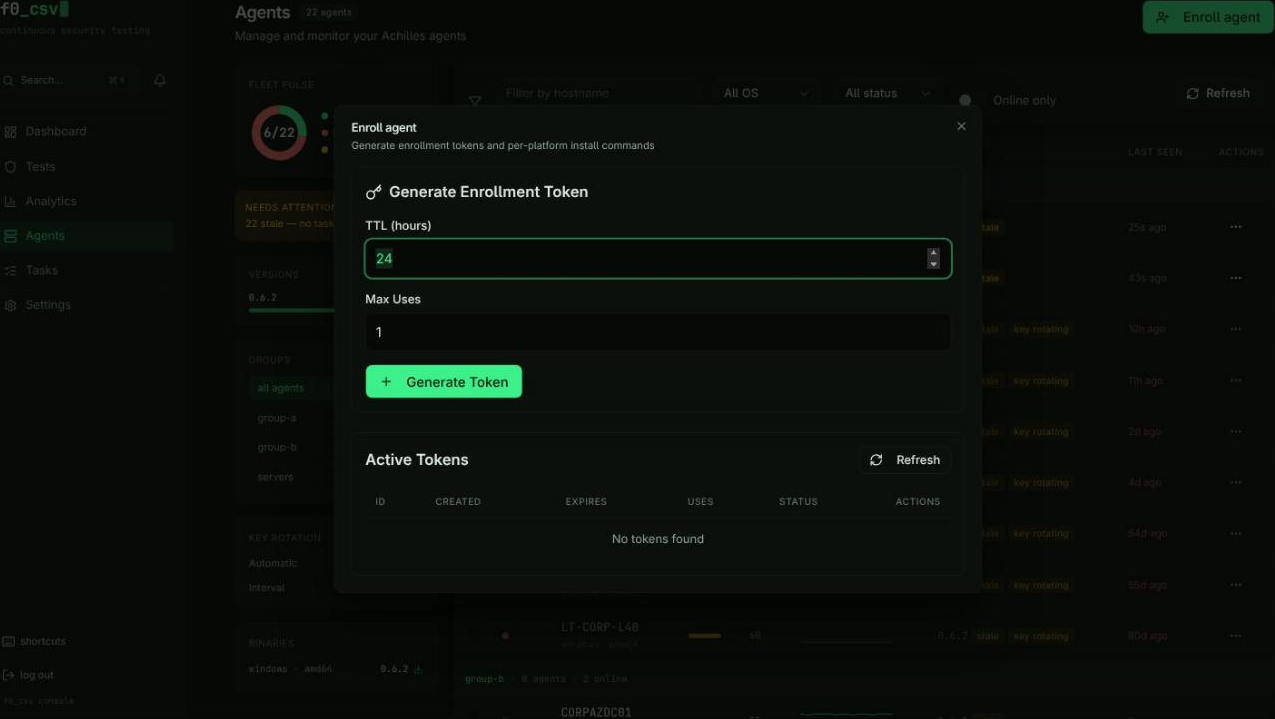
The enrollment interface is accessed from the Agents section and provides two main areas: token generation and token management.
Token Generation
- Set the TTL (hours) -- how long the token remains valid
- Set the Max Uses -- how many agents can enroll with this token
- Click Generate Token
- The token string and platform-specific installation commands appear immediately
The full token string is displayed only once at creation time. Copy it before navigating away. You can still see the token's status and metadata in the token list, but the raw string is not shown again.
Installation Commands
When a token is generated, the UI automatically produces ready-to-copy installation commands for every supported platform:
- Linux (amd64/arm64) --
curl-based download with the token and server URL embedded - macOS (Intel / Apple Silicon) -- Platform-specific binary download
- Windows -- PowerShell-based installation command
Each command includes a Copy button for one-click clipboard copying.
Token Status Indicators
The token list table shows a status badge for each token:
| Badge | Meaning |
|---|---|
| Active | Token is valid and has remaining uses |
| Expired | Token has passed its TTL expiration time |
| Exhausted | Token has reached its maximum use count |
For large deployments, create a token with a high Max Uses value and distribute the same installation command across your fleet using your configuration management tool (Ansible, SCCM, etc.).
Agent Management Dashboard
After agents are enrolled, the Agent Dashboard provides fleet-wide monitoring:
- Fleet Metrics -- Total agents, online/offline counts, pending tasks
- Health KPIs -- Fleet uptime, task success rates, mean time between failures
- Distribution Charts -- Agent version distribution, OS breakdown, status summary
- Recent Tasks -- Latest task executions across the fleet
The dashboard auto-refreshes every 30 seconds. Stale agents (those that have not sent a heartbeat recently) are flagged with a warning indicator.
Agent List
The main agent list supports:
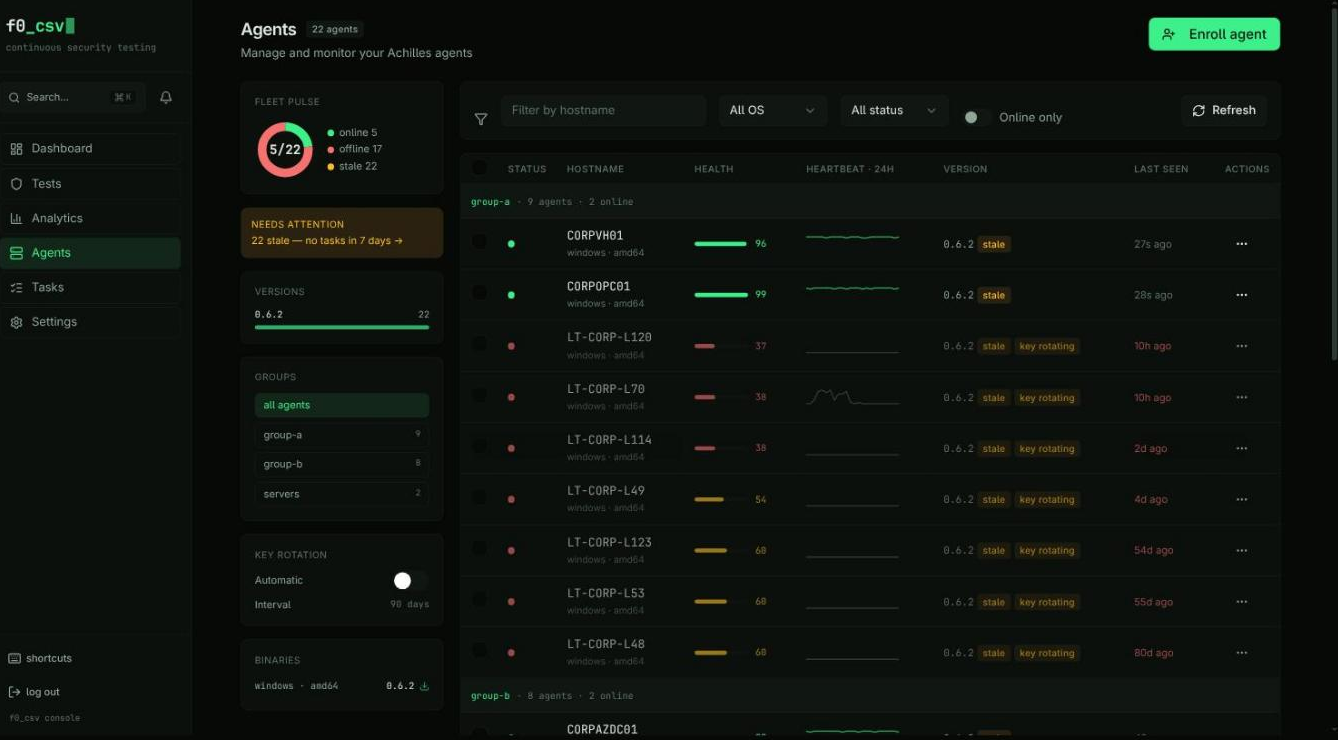
- Filtering by hostname, OS, status, and online state
- Bulk operations such as tagging, triggering updates, and uninstalling
- Real-time polling every 15 seconds for silent status updates
- Version tracking with outdated-agent detection and one-click update prompts
Agent Detail View
Click any agent to open its detail page with four tabs:
| Tab | Contents |
|---|---|
| Overview | System info, metadata, tags, recent tasks |
| Task History | Paginated execution history with status filtering |
| Heartbeat | Time-series charts for CPU, memory, and disk usage |
| Event Log | Chronological lifecycle events (enrollment, key rotation, updates) |
The detail view refreshes automatically every 30 seconds.
Administrative Operations
Key Rotation
Rotate an agent's API key from the agent detail page, or let automatic rotation do it on an interval (Agents → Key Rotation in the utility rail).
Rotation is two-phase. The new key is stored as pending and handed to the agent in a heartbeat response; both keys authenticate until the agent shows which one it holds.
A rotation is resolved by evidence, never by a timer:
| The agent presents | What happens |
|---|---|
| The new key | Promoted to primary — the agent has proven it holds it |
| The old key, grace period still open | Nothing; the agent simply hasn't collected the new key yet |
| The old key, grace period expired | Rotation cancelled, current key kept, key_rotation_cancelled recorded in the event log |
The grace period (5 minutes) bounds delivery — how long a heartbeat will hand the pending key out — not how long either key is accepted.
When the grace period lapses the server cannot tell whether the agent received the new key or was simply offline, and either guess locks an agent out for good. Promoting strands an agent that was asleep through the window: the key it holds is no longer valid. Cancelling strands the opposite case: an agent that did collect the key, then went offline, returns holding one the server discarded. Waiting for the agent to present a key resolves both correctly.
Automatic rotation is on by default, every 90 days, and can be turned off or re-intervalled from the Key Rotation card in the Agents utility rail. An explicit choice is remembered: if you switch it off, upgrades will not turn it back on.
It only targets online agents. An agent that hasn't heartbeat in the last two minutes is skipped and picked up by a later sweep, because the heartbeat is the delivery channel — arming a rotation on a sleeping laptop just creates a pending key nobody can collect.
Uninstall
Agents can be uninstalled individually or in bulk. The uninstall dialog includes cleanup options and handles batch processing with progress feedback.
Tag Management
Apply tags to one or more agents at a time for organizational grouping. Tags can be used as filters when creating tasks or viewing the agent list.
Permissions
Agent management actions are gated by role-based permissions:
| Action | Required Permission |
|---|---|
| Create enrollment tokens | endpoints:tokens:create |
| Modify agents (enable/disable, tag) | endpoints:agents:write |
| Delete agents | endpoints:agents:delete |
UI elements are hidden when the current user lacks the required permission.