Deploying Agents
Building Agent Binaries
From the Web UI
Settings → Agent offers two routes, and which you want depends on where the binary should come from.
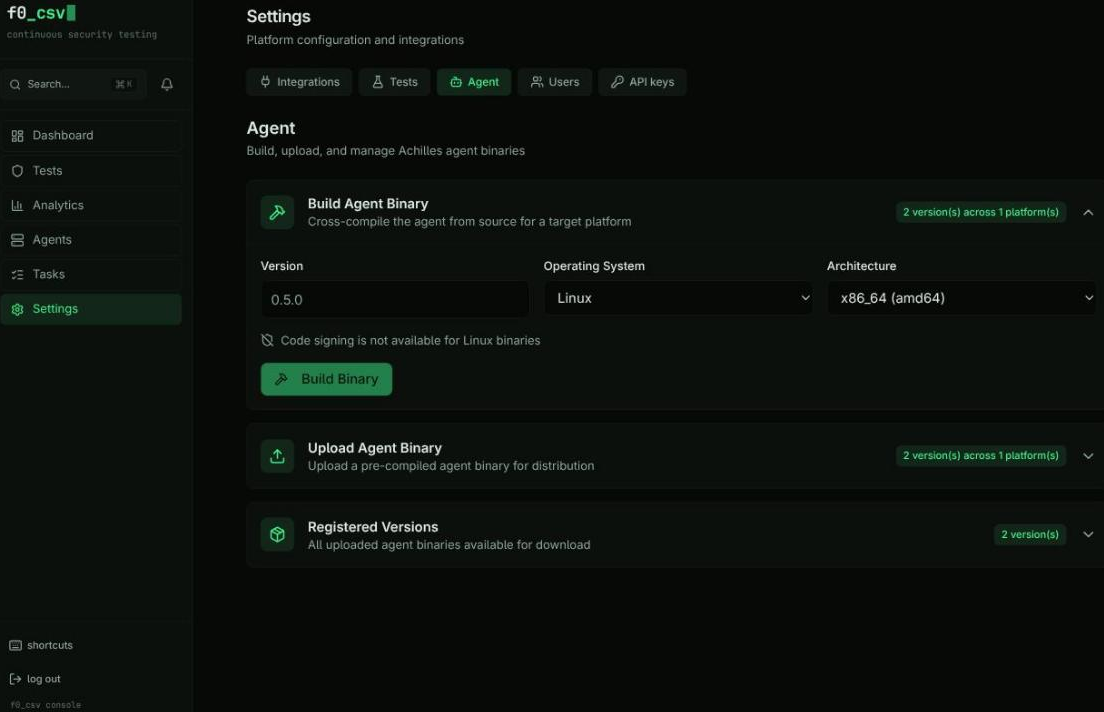
Upload a pre-built binary (recommended for releases)
Upload a binary from a tagged GitHub release and choose the certificate to sign it with — the active certificate by default.
This is the safer route for a release, because it separates two things that are easy to conflate:
- Provenance comes from the release artifact, which was built from a tagged
commit and can be checked against the release's
SHA256SUMS - Trust comes from your certificate, which is what your endpoints are actually configured to accept
Nothing depends on which agent source happens to be deployed on the server.
Signing is required by default: if no certificate is available or signing fails, the upload is rejected rather than quietly registering an unsigned binary. Tick Register unsigned if signing fails only when you know the target endpoints do not enforce application control.
| Platform | Signing |
|---|---|
| Windows | Authenticode, with the certificate you select |
| macOS | Ad-hoc — no certificate required |
| Linux | None; no ecosystem equivalent |
Re-signing is also how you roll a binary onto a new certificate without rebuilding it: upload the same file again and pick the new cert.
Build from source
Cross-compiles on the server and signs Windows output with the active certificate. Available where the Go toolchain is present (Docker Compose, self-hosted and on-prem servers, Fly.io, Render).
The build compiles whatever agent/ source is deployed on that server, and
stamps the version string from the form field. Nothing cross-checks them — so
building "0.6.3" on a server still running 0.6.2 source produces a binary that
claims a version it does not contain. Redeploy the instance first, or upload a
release artifact instead.
Signing failure on this path is non-fatal by design (the build still produced a working binary), so check that Registered Versions shows the version as signed. An unsigned Windows binary is flagged there in amber.
From Source
cd agent
make build-all    # Cross-compile for all platforms
| Target | Binary Name |
|---|---|
| Windows amd64 | achilles-agent-windows-amd64.exe |
| Linux amd64 | achilles-agent-linux-amd64 |
| macOS amd64 | achilles-agent-darwin-amd64 |
| macOS arm64 | achilles-agent-darwin-arm64 |
Installing the Agent
Windows
# Run as Administrator
.\achilles-agent.exe --enroll --server https://backend.example.com --token <token>
.\achilles-agent.exe --install
.\achilles-agent.exe --run
The agent installs as a Windows Service (SCM) running as SYSTEM.
Linux
sudo ./achilles-agent --enroll --server https://backend.example.com --token <token>
sudo ./achilles-agent --install
sudo ./achilles-agent --run
The agent installs as a systemd service.
macOS
sudo ./achilles-agent --enroll --server https://backend.example.com --token <token>
sudo ./achilles-agent --install
sudo ./achilles-agent --run
The agent installs as a launchd plist at /Library/LaunchDaemons/.
Agent Diagnostics
./achilles-agent --status
Shows service state, connection health, configuration validation, and last heartbeat timestamp.