Task Execution
Creating a Task
- Navigate to Agents → select an agent
- Click Create Task
- Select the test to execute
- Choose the platform and architecture for the binary
- Optionally specify a target Elasticsearch index
- Click Submit
The task enters the pending queue and is picked up by the agent on its next poll.
Task Lifecycle
pending → assigned → downloading → executing → reporting → completed/failed
- Pending — Task created, waiting for agent to poll
- Assigned — Agent picked up the task
- Downloading — Agent downloading the test binary
- Executing — Binary running on the endpoint
- Reporting — Agent sending results back
- Completed/Failed — Final state with exit code and output
Automatic Task Retry
When a task fails because its agent went offline during execution, the system automatically creates a retry task:
- Retries target the same agent (it picks up the task when it reconnects)
- Default maximum retries: 2 (configurable per task via
max_retries) - Only
execute_testtasks are retried (not update, uninstall, or command tasks) - Each retry preserves the original task's payload, priority, and batch grouping
Retry tasks appear in the task list with a "Retry 1/2" badge. The original_task_id field links back to the root task for audit tracing.
Retries are created automatically by the expireStaleTasks background job. No manual intervention is needed. If you need to stop retries for a specific task, cancel the pending retry task.
Execution Timeout Expiry
Tasks can also be expired when they exceed the configured execution_timeout — even if the agent remains online. This catches cases where the agent-side timeout fails to kill a hung process (e.g., a child process escaped the Windows Job Object) but the heartbeat goroutine continues running.
The backend checks assigned_at + execution_timeout + 120s buffer on each task poll. Tasks that exceed this threshold are marked as failed with an execution timeout error. This runs alongside the existing stale task detection (agent offline) in getNextTask().
Local Result Queue
If the agent completes a task but cannot report the result (server unreachable, all retry attempts exhausted), the result is persisted locally as a JSON file in the agent's work directory:
{work_dir}/queue/{task_id}.json
The queue is drained automatically on the next successful heartbeat. Key details:
- Maximum queue size: 100 results (oldest preserved, newest dropped if full)
- Queue files are written with restricted permissions (
0600) - Results are delivered in FIFO order and deleted after successful delivery
- If the drain encounters a delivery failure, it stops (server still unreachable) and retries on the next heartbeat
This ensures no test results are lost during extended server outages.
Failure Reason Display
When a task fails, the failure reason is displayed in the Tasks page:
- Expanded view — A red error banner shows the specific failure reason (e.g., "SHA256 mismatch: expected abc, got def", "download binary: connection timeout", "Agent went offline during execution")
- Collapsed view — A truncated failure reason appears below the task name in the task list row
- Exit code — Failed tasks show exit code
-1for pre-execution failures (download errors, verification failures) and259for execution timeouts
The agent sends failure context for all error types: binary download failures, SHA256/size mismatches, execution errors, update failures, and uninstall failures. For tasks that fail because the agent went offline, the backend generates a structured error result automatically.
Task Results
Results include:
- Exit code — test-defined outcome code:
101(attack succeeded — unprotected),105/126/127(blocked or quarantined — protected),0(normal exit — inconclusive, varies by test),1(binary not recognized / permission denied) - Stdout/Stderr — Captured output from the test binary
- Execution duration
- Timestamp
Results are ingested into Elasticsearch for analytics.
Binary Verification
Before execution, the agent verifies:
- SHA256 checksum — Matches the expected hash
- Ed25519 signature — Cryptographically signed by the server's private key
If either check fails, the task is rejected.
Task Creation Dialog
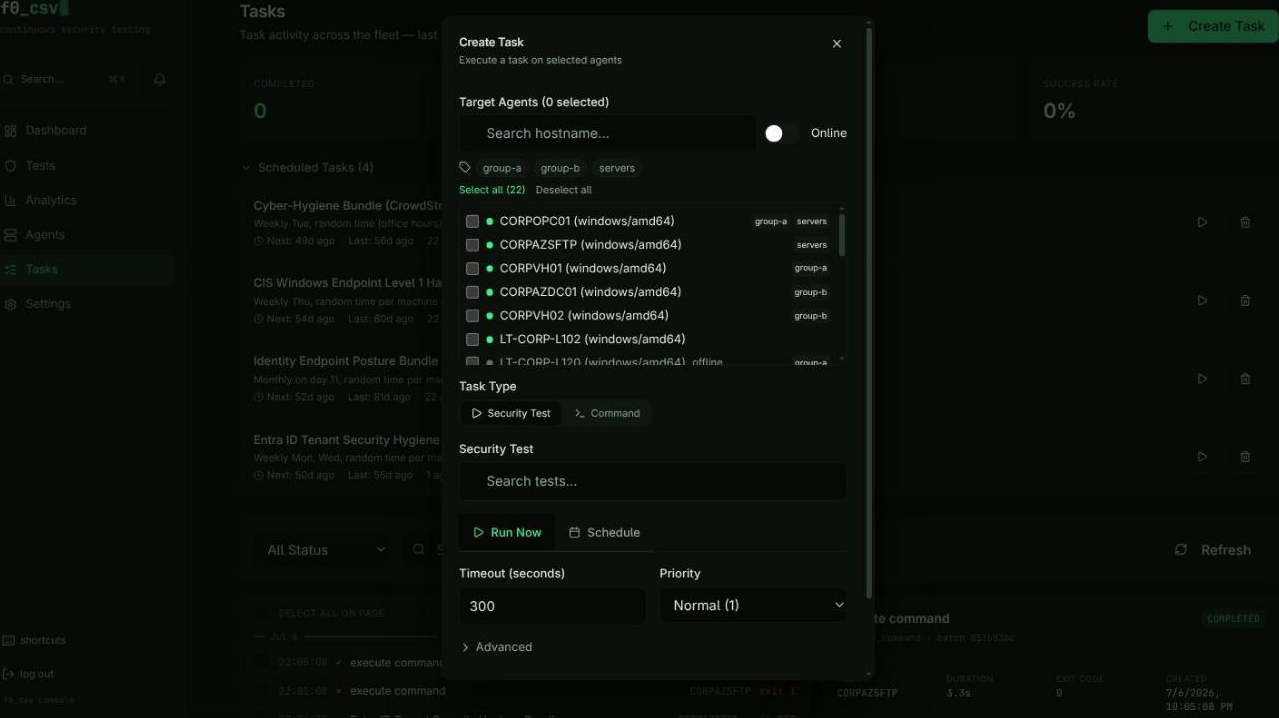
The task creation dialog supports two task types and multiple scheduling options.
Task Types
- Security Tests -- Select a pre-built test from the library. The dialog validates that a compiled binary exists before allowing submission.
- Shell Commands -- Run an arbitrary command across selected agents. Useful for ad-hoc diagnostics or custom scripts.
Agent Selection
The agent selector provides filtering and bulk operations:
- Search by hostname
- Filter by tags using multi-select dropdowns
- Online-only toggle to exclude offline agents
- Select All / Deselect All for the currently filtered list
- Each agent row shows its online/offline status, hostname, OS, architecture, and tags
Scheduling Options
| Schedule Type | Description |
|---|---|
| Run Now | Immediate execution on next agent poll |
| Once | One-time execution at a specific date and time |
| Daily | Recurring daily at a fixed time, or randomized within business hours (09:00--17:00) |
| Weekly | Recurring on selected days of the week |
| Monthly | Recurring on a specific day of the month |
All schedule types support timezone selection. Randomized scheduling distributes execution times across business hours on weekdays to avoid predictable patterns.
Use randomized daily schedules for production environments. This prevents defenses from learning a predictable test execution pattern, giving you a more realistic measure of detection capability.
Integration Validation
Before submitting, the dialog checks for required integrations:
- Tests that target Azure/Entra ID validate that Azure credentials are configured
- A target Elasticsearch index can be selected for result storage
Task Management Page
The Tasks page is the central control panel for all task activity.
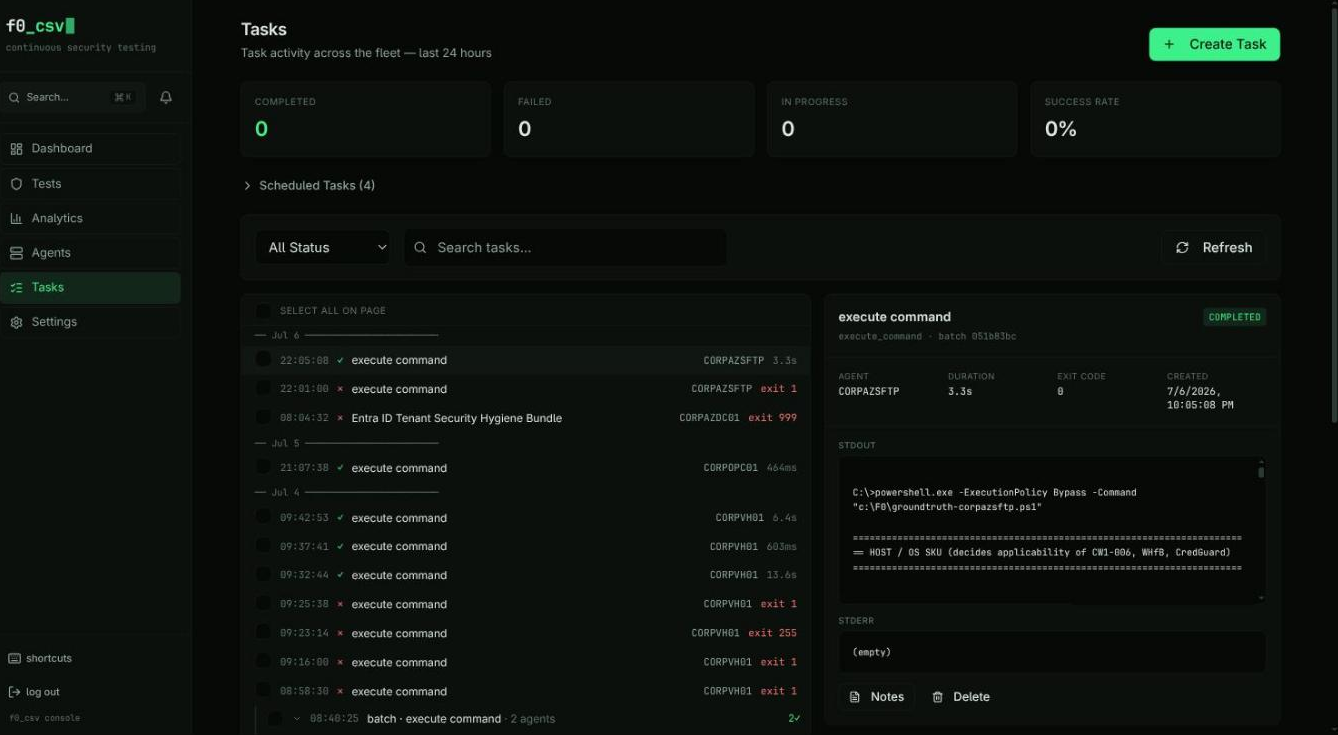
Task stream
Tasks render as a chronological stream rather than a paginated grid:
- Date markers separate days, so "when did this run" is answerable at a glance
- Status glyphs (
✓/✕/ spinner) replace badges in the row itself, keeping each line to one dense mono row: time, type, agent, duration or exit code - Batch rows — a task targeting multiple agents collapses into one parent row with an aggregated
n✓summary; expand it to see each agent's outcome - Single tasks render as flat rows
Selecting a row opens the detail panel on the right: status, agent,
duration, exit code, created time, batch id, and the full STDOUT / STDERR.
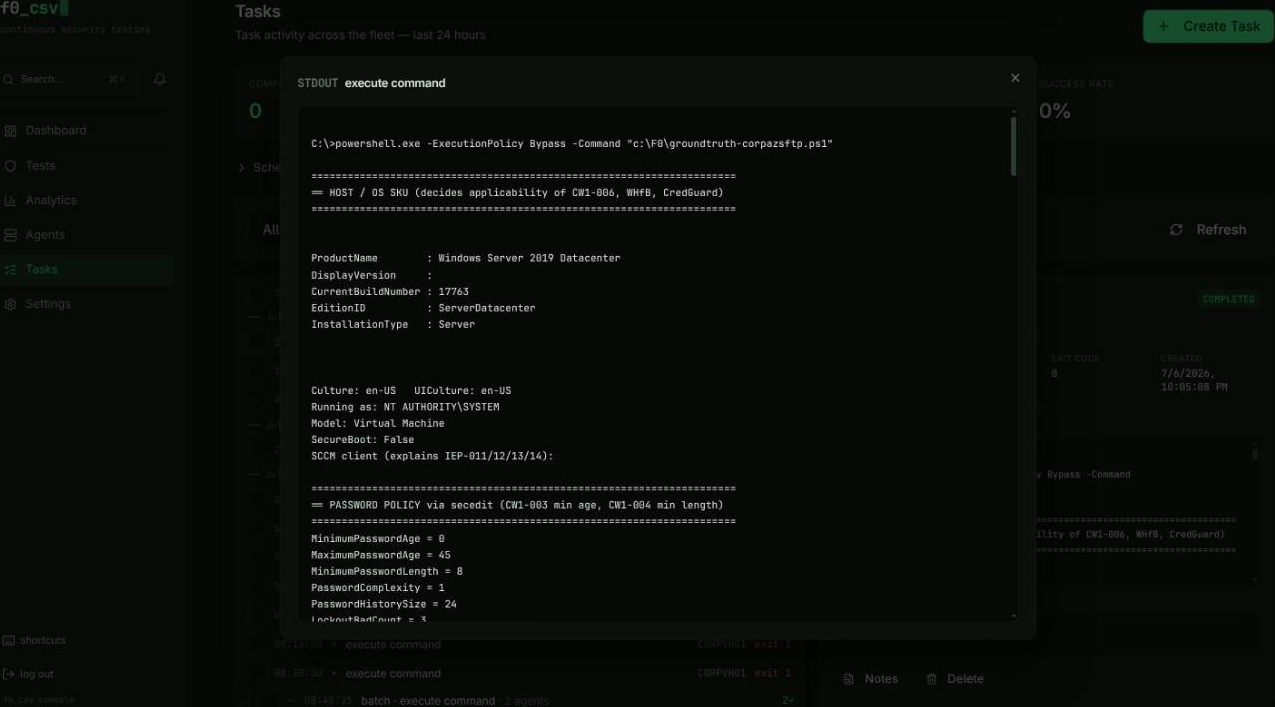
Expanded output view
Click either output block — or focus it and press Enter — to open it in a
full-width dialog with a 70vh scroll area. Long bundle output (a
cyber-hygiene run can emit hundreds of lines) is readable without scrolling a
200-pixel box.
Retrying a failed task
Failed execute_test tasks carry a Retry action in the detail panel. It
re-dispatches the same test to the same agent as a new pending task and links
the two through original_task_id, so the retry chain stays auditable. The
stream marks retried tasks with a Retry n/m chip.
Manual retries are not capped by the task's max_retries budget — that governs
automatic retries only. Command tasks cannot be retried this way; re-issue them
from Create Task instead.
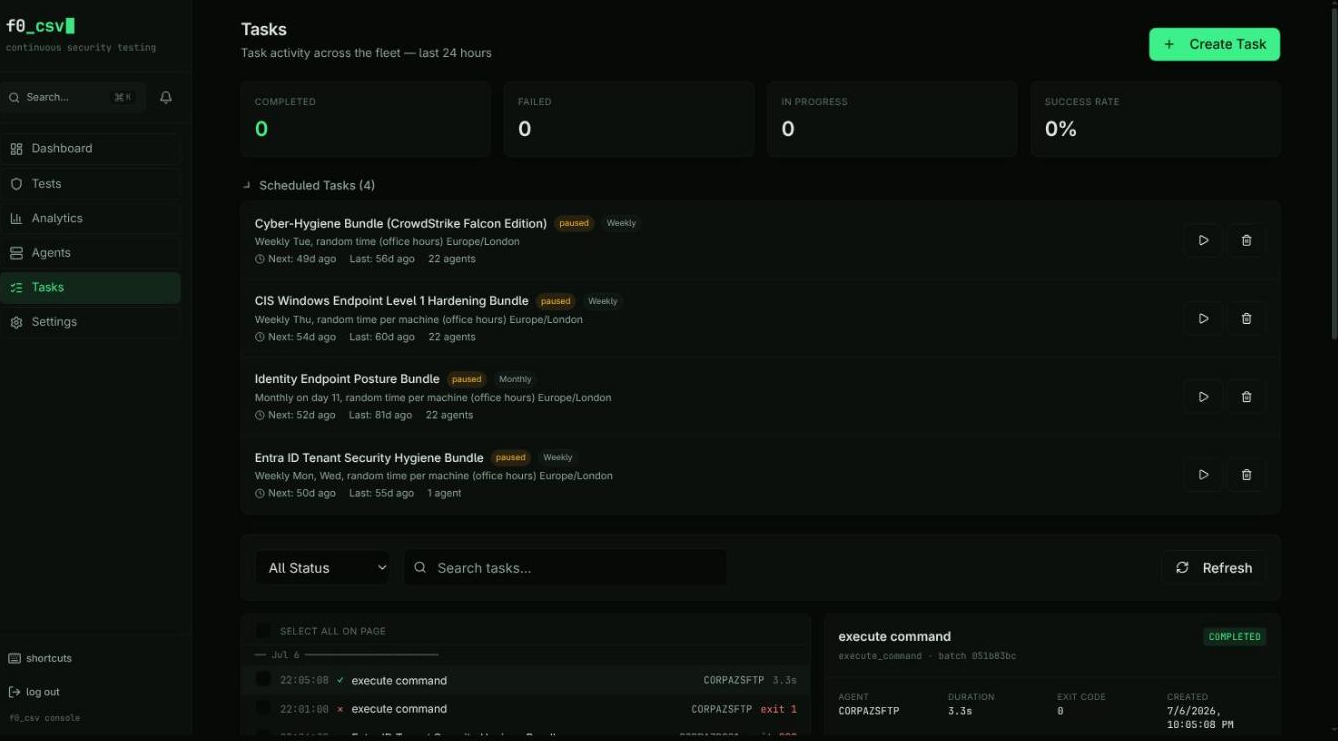
Scheduled tasks
The Scheduled Tasks section sits above the stream, collapsed by default so the day's activity is what you see first. Expand it for each schedule's cadence, next and last run, agent count, and run-now / delete actions.
Status Badges
Each task shows a color-coded status badge:
| Status | Color | Description |
|---|---|---|
| Pending | Gray | Waiting for agent to poll |
| Assigned | Blue | Agent picked up the task |
| Downloading | Blue | Agent downloading binary |
| Executing | Amber | Binary running on endpoint |
| Completed | Green | Finished, and the result reported a zero exit code |
| Failed | Red | Finished with error — including tasks that technically completed but reported a non-zero exit code |
| Expired | Gray | Agent did not pick up in time |
Task tables render honest status: a task the agent marked completed whose result carries a non-zero exit code is displayed as Failed, not Completed. The stored status is unchanged — only the display tells the truth about the outcome.
Filtering and Search
- Filter by task status using the status dropdown
- Free-text search across task content (test names, hostnames, commands)
- Search is debounced to avoid excessive API calls while typing
Bulk Operations
Select multiple tasks using checkboxes, then use bulk actions to:
- Cancel all selected pending/assigned tasks
- Delete selected tasks from the list
Pagination
Configure page sizes of 25, 50, or 100 tasks per page with navigation controls at the bottom.
Real-Time Updates
The task list polls every 10 seconds for status changes. Polling is silent -- it does not clear your current selection or scroll position.
Schedule Management
Below the task list, the Schedules section displays all recurring schedules:
- Human-readable schedule descriptions (e.g., "Every weekday at 09:30 UTC")
- Next and last run timestamps with relative formatting
- Status indicators: Active, Paused, or Completed
- Agent count per schedule
- Actions: Pause/Resume and Delete (with confirmation)
Pausing a schedule stops future executions but preserves the configuration. Deleting is permanent. Pause first if you are unsure.
Task Notes
Add annotations to any task by clicking the notes icon. Notes are useful for documenting:
- Why a task failed and what was investigated
- Follow-up actions taken after a test result
- Context for other team members reviewing task history
Permissions
Task-related actions are gated by role-based permissions:
| Action | Required Permission |
|---|---|
| Create tasks | endpoints:tasks:create |
| Cancel tasks | endpoints:tasks:cancel |
| Delete tasks | endpoints:tasks:delete |
| Manage schedules | endpoints:schedules:write |
| Delete schedules | endpoints:schedules:delete |
Actions are hidden from the UI when the current user lacks the required permission.