Microsoft Defender
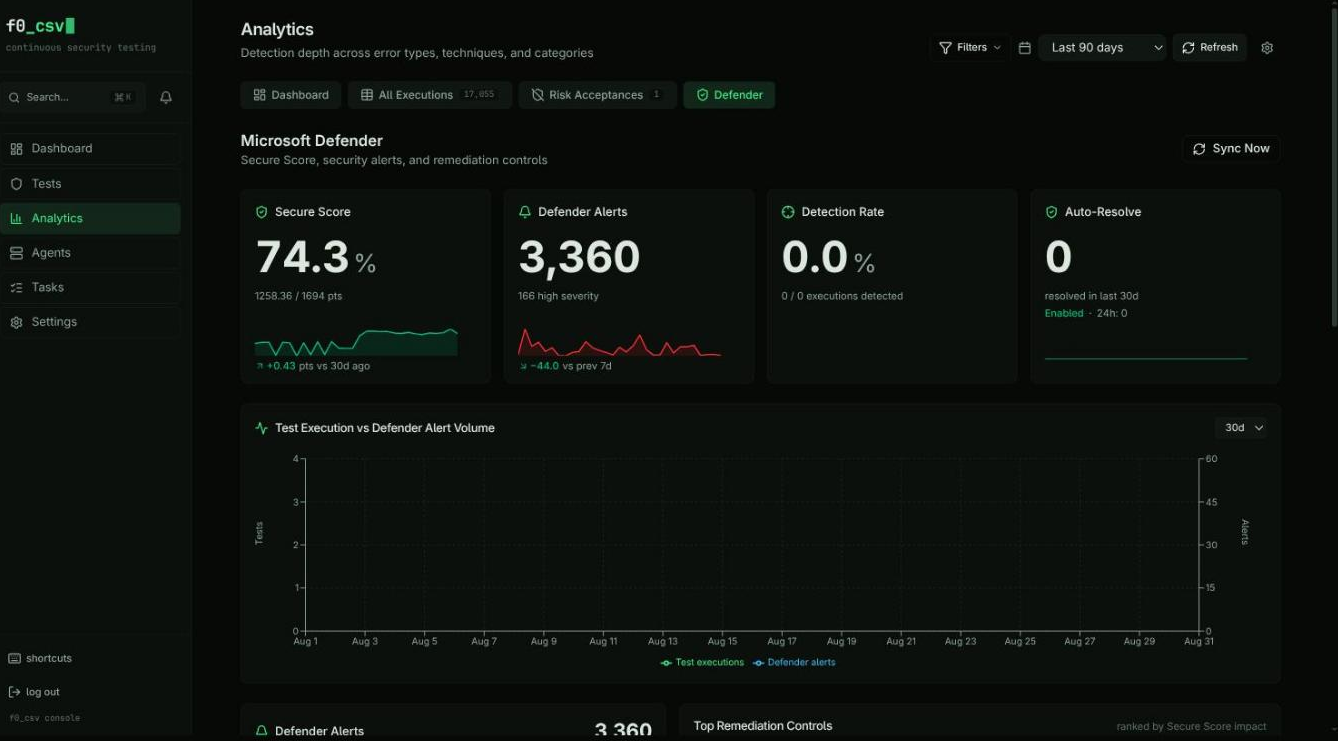
When the Microsoft Defender integration is configured, a dedicated Defender tab appears in the Analytics dashboard. It answers one operational question:
Of the attack simulations we launched, what share did Microsoft Defender catch?
If the integration is not configured the tab is hidden entirely — the
useDefenderConfig() hook gates the whole tab so unconfigured users never see
empty panels. To set the integration up, see
Integrations → Microsoft Defender.
Tab Header
The header shows when Defender data was last synced and provides a Sync Now button to trigger an immediate pull from Microsoft Graph instead of waiting for the next scheduled interval.
Hero Row
Four tiles summarize posture at a glance:
| Tile | What it shows |
|---|---|
| Secure Score | Current Microsoft Secure Score as a percentage, raw current / max points, the change versus the trend window, and a sparkline. |
| Defender Alerts | Total alert count in the window, how many are high-severity, and the change versus the previous 7 days. Click the tile to open the alert drawer for all alerts. |
| Detection Rate | The headline metric — the per-execution share of attack simulations that Defender detected, plus a row of coverage pips showing detected vs. missed techniques. |
| Auto-Resolve | Current auto-resolve mode (disabled / dry-run / enabled) and recent receipt counts. See Auto-Resolve. |
The Detection Rate is correlatedExecutions / totalExecutions, counted per
MITRE technique. It is an organisation-specific operational KPI — track it
over time for your own tenant, but do not use the absolute number to compare
organisations. The full definition, including MITRE roll-up and exclusions,
is documented in Detection Rate below.
Correlation Timeline
The Test Execution vs Defender Alert Volume card plots two series on a shared time axis: how many attack simulations Achilles ran, and how many Defender alerts were raised. Aligning the two makes it easy to see whether a burst of testing produced a corresponding burst of detections.
Alert Breakdown & Remediation Controls
- Alerts Summary — breaks alerts down by severity and status so you can see the shape of the queue at a glance.
- Top Controls — the Defender security controls most relevant to your current gaps. Clicking a control opens the alert drawer scoped to the techniques that control covers.
Detection Analysis & Technique Overlap
Two side-by-side per-technique bar charts:
- Detection Analysis — per-technique detection coverage from the detection rate computation. Click a technique to drill into its alerts.
- Technique Overlap — MITRE ATT&CK techniques present in both datasets:
- tested by Achilles and detected by Defender (validated coverage),
- tested but not detected (detection gaps),
- detected by Defender but not tested (untested detections).
Alert Drill-Down Drawer
Clicking the Defender Alerts tile, a control, or a technique opens the Alert Details drawer. It lists the matching alerts with severity, status, MITRE techniques, evidence, and — when present — the auto-resolve receipt showing whether and how the alert was resolved.
Detection Rate
The Detection Rate is per-execution:
detectionRate = correlatedExecutions / totalExecutions × 100
- totalExecutions — attack-simulation executions in the window, counted per technique. A test exercising N techniques contributes N observations.
- correlatedExecutions — those with a temporally-correlated Defender alert for the matching technique (or its parent — see MITRE roll-up).
MITRE roll-up
Defender frequently tags alerts at parent technique granularity (T1574)
even when the simulated behaviour is a specific sub-technique (T1574.002).
Correlation is roll-up aware:
- A sub-technique test (
T1574.002) is satisfied by a parent alert (T1574). - Roll-up is one-directional — a parent test (
T1574) is not credited by a sibling sub-technique alert.
Exclusions
Two kinds of document are excluded from the test-execution count because neither launched an attack Defender could detect:
- Cyber-hygiene controls — configuration checks, not attack simulations.
- Skipped bundle stages — stages the orchestrator chose not to run (a bundle
control with exit code
0), which the Executions table also renders as "Skipped".
Every Defender-tab metric that counts executions applies the same exclusions
(attackSimulationExclusions()), so "test execution" means the same thing
across the whole tab. The Dashboard tab's Defense Score
deliberately does not apply them — a passing hardening check legitimately
counts toward that score.
The Detection Rate is an analytics rollup, not a per-event join. Test executions and alerts are bucketed into 1-hour intervals, and correlation keys on the MITRE technique string. Alerts with an empty technique array (common for malware-family AV detections) cannot be correlated by this metric — use the per-test evidence correlation in the alert drawer for those cases.
Conditional Display
Every element of the Defender tab is gated by useDefenderConfig(), which
returns { configured, loading }. When configured is false the tab is not
rendered at all, so users who have not set up the integration see only
Achilles-native analytics.
See Also
- Integrations → Microsoft Defender — setup and architecture
- Auto-Resolve — programmatically resolving correlated alerts
- Defender API endpoints