Risk Acceptance
Overview
Risk Acceptance allows you to formally acknowledge that certain security controls are not detected — and that this is an accepted risk rather than a gap to fix.
Accepting Risk
- In the Execution Table or Defense Score breakdown, find the unprotected control
- Click the Accept Risk button on the row
- Choose the scope using the toggle:
- All Hosts (default) — excludes the test/control from Defense Score across the entire organization
- This Host Only — scopes the exclusion to the specific hostname where the failure occurred
- Provide a justification (required)
- The control is marked as "Risk Accepted" and excluded from the Defense Score calculation
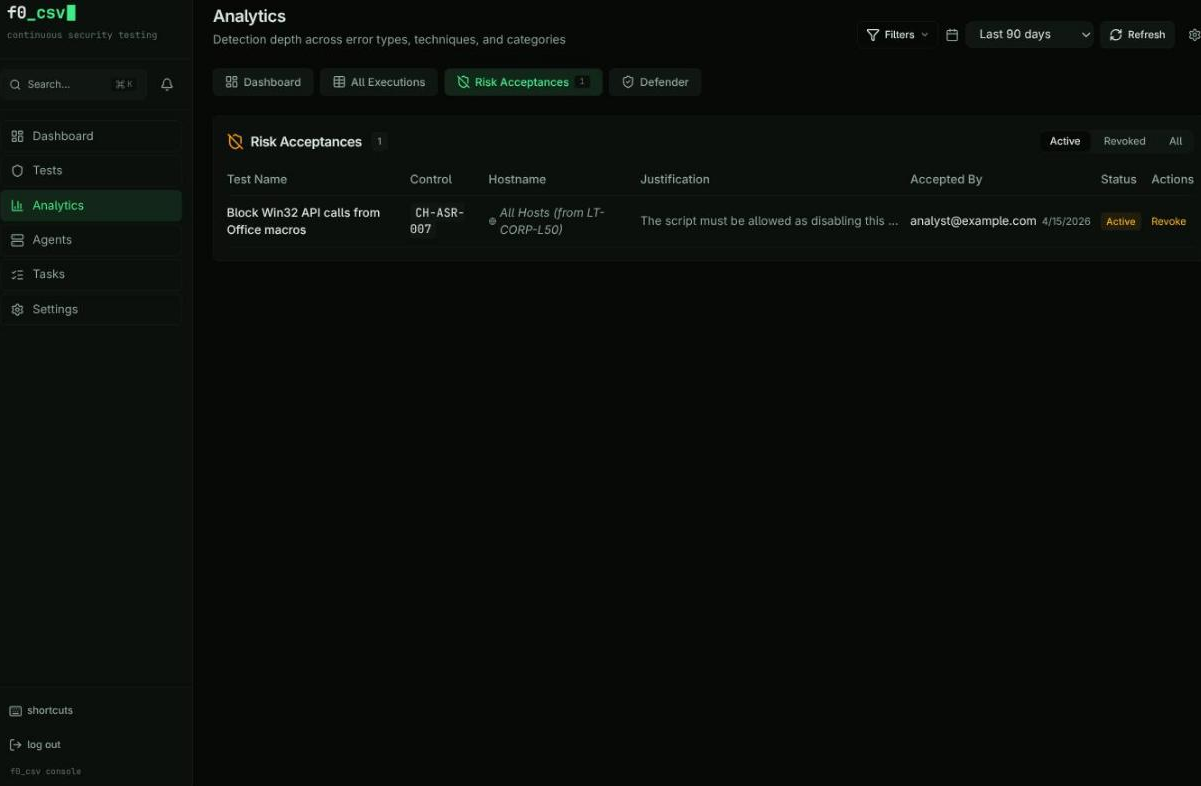
Audit Trail
All risk acceptance decisions are tracked with:
- Who accepted the risk (Clerk user ID)
- When the decision was made
- Why (the justification provided)
Revoking Acceptance
Risk acceptance can be revoked at any time, which returns the control to the "Unprotected" category and recalculates the Defense Score.
Acceptance Scope
The Accept Risk dialog provides a scope toggle with two options:
| Scope | Behavior | Example Use Case |
|---|---|---|
| All Hosts (global) | Excludes the test/control from Defense Score across all endpoints | A test that triggers false positives everywhere, or a CIS control that conflicts with business requirements |
| This Host Only (host) | Excludes only on the specific hostname where the failure occurred | A legacy server that cannot be patched, while other endpoints should still be tracked |
The hostname is always stored for audit trail regardless of scope. When choosing scope, prefer This Host Only unless the business justification applies organization-wide.
Risk acceptances created before the scope toggle was added fall back to current behavior: records with a hostname are treated as host-scoped, records without are treated as global.
Risk Scoring Model
Accepted risks are excluded from the Defense Score calculation through an Elasticsearch exclusion filter. The flow works as follows:
The exclusion filter generates Elasticsearch must_not clauses that match the test_name, control_id, and hostname fields of each active acceptance. This means:
- Accepted tests no longer count as "Unprotected" in the Defense Score
- Heatmap cells for accepted risks show a distinct visual state
- Treemap tiles for accepted controls are grouped separately
Active acceptances are cached in memory for 60 seconds to avoid hitting Elasticsearch on every Defense Score query. The cache is automatically invalidated when a new acceptance is created or revoked.
Heatmap Integration
Accepted risks appear as a distinct state in the MITRE ATT&CK heatmap:
| Heatmap Color | Meaning |
|---|---|
| Green | Protected (test passed) |
| Red | Unprotected (test failed) |
| Yellow/Amber | Risk Accepted (excluded from scoring) |
| Gray | Not tested |
This visual distinction ensures that accepted risks are visible to the team without inflating the "unprotected" count.
Acceptance Workflow
The full lifecycle of a risk acceptance:
Data Model
Each risk acceptance is stored as an immutable document in the achilles-risk-acceptances Elasticsearch index:
| Field | Type | Description |
|---|---|---|
acceptance_id | keyword | Unique UUID |
test_name | keyword | Security test name |
control_id | keyword | Bundle control ID (optional) |
hostname | keyword | Target hostname (always stored for audit) |
scope | keyword | global (all hosts) or host (this host only) |
justification | text | Business justification (required) |
accepted_by | keyword | Clerk user ID |
accepted_by_name | keyword | Display name |
accepted_at | date | ISO timestamp |
status | keyword | active or revoked |
revoked_at | date | Revocation timestamp (if revoked) |
revoked_by | keyword | Revoker user ID (if revoked) |
revoked_by_name | keyword | Revoker display name (if revoked) |
revocation_reason | text | Reason for revocation (if revoked) |
Revoking an acceptance does not delete the original record. Instead, the document is updated with status: 'revoked' and the revocation metadata fields are populated. This preserves the complete audit trail for compliance reporting.
Audit Trail
The audit trail captures every risk decision with full context:
- Who accepted or revoked the risk (Clerk user ID and display name)
- When the action was taken (ISO timestamp)
- What was accepted (test name, control ID, hostname)
- Why the decision was made (justification or revocation reason)
Use the Risk Acceptances table in the Analytics dashboard to review all active and historical acceptances. Filter by status (active / revoked), test name, or date range.